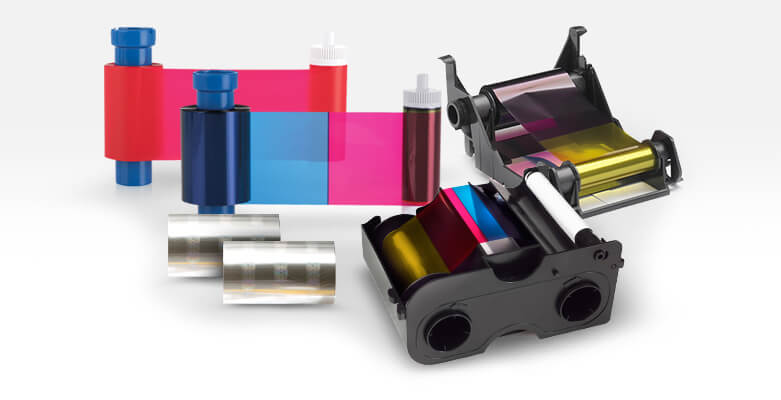
 Don’t let the letter combinations confuse you, choosing the right card printer ribbon can be easy once you define your printing goals.
To help you choose the right card printer ribbon for your needs, we’ve listed the top five considerations below, along with a ribbon types at-a-glance guide.
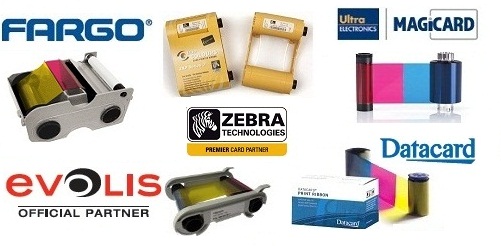
ID Card Group carries a wide range of ribbons for all the leading printer brands including standard YMCKO ribbons and specialty ribbons.
Shop YMCK, YMCKO, YMCKOK Ribbons & More from Leading ID Card Printer Manufacturers
- AlphaCard color ribbons & AlphaCard monochrome ribbons
- Datacard color ribbons & Datacard monochrome ribbons
- IDP color ribbons & IDP monochrome ribbons
- Evolis color ribbons & Evolis monochrome ribbons
- Fargo color ribbons & Fargo monochrome ribbons
- Magicard color ribbons & Magicard monochrome ribbons
- Zebra color ribbons & Zebra monochrome ribbons
Top 5 Considerations for Choosing the Right Ribbon
1. Full-Color or Single-Color (Monochrome)?
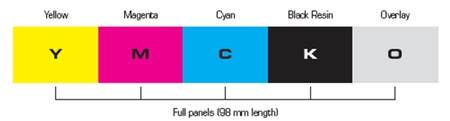
Typically, if you’re printing photo-quality IDs you’ll need a four-color YMCK ribbon.
All colors in the visible spectrum can be produced using a combination of four colors: Yellow (Y), Magenta (M), Cyan (C), and Black (K). For example, Yellow and Cyan combine to make green. The brilliant design of your card printer, along with your ID card software, allows you to print literally millions of color variations and nuances using combinations of these colors – resulting in stunning photo realistic effects.
However, if you’re printing text or single-color images, or personalizing a pre-printed card with a single color, you’ll be fine choosing from monochrome options. You can even layer monochrome images on a colored plastic card.
2. Overlays for Added Security and/or Protection?
The “O” in the ribbon name signifies a clear, protective overlay that eliminates the need for a laminator. YMCKO ribbons add years of life to your cards and badges, eliminating the need for the time and hassle of laminating them.
Because of their versatility, YMCKO ribbons are the most popular ribbon type produced. Printer manufacturers make multiple sizes to fit all printer models.
An “O panel” overlay:
- Provides extra protection from tampering
- Reduces the wear and tear caused to cards by abrasion – whether from pocket or wallet storage, or when hung from a lanyard or neck strap
- Reduces dye migration that occurs during the printing process
Simply put, a YMCKO ribbon is designed to print vivid full color cards that meet even the most stringent requirements. Alternatively, if your ID Cards will be kept strictly in a protective badge holder, using a ribbon with a clear overlay panel may not be necessary. In that case, an YMCK ribbon will do just fine.
3. Single-Sided or Dual-Sided Printing?
If you’re printing only on one side of the ID card, you can choose from four-color YMCK, four-color with overlay (YMCKO), or single color monochrome ribbons.
However, if you need to print on both sides of the card, you’ll need a YMCKOK dual-sided ribbon. This six-panel ID Card ribbon will print full color on one side, along with a clear overlay, and black (represented by “K”) on side two. The back side print can include black text or barcodes.
To print full color designs on BOTH sides of a card, you will want a YMCK or YMCKO ribbon – but be aware that you will get half the number of cards per ribbon, since you are using two full sets of panels for each card.
4. Number of Cards to Print?
Each card printer ribbon has a specific number of plastic cards it will print, which can run anywhere from 170 images per roll up to 3,000 images. The larger the ribbon print size, the less the cost per print – and the higher capacity also saves on packaging/shipping.
Several printer vendors – especially Zebra and Evolis – now offer higher capacity ribbons. See high capacity ribbons from Zebra here and from Evolis here.
Before buying your ID ribbon, estimate how many cards you will need to print for your operation in the near-term, so you can select the best option.
5. Type of Printer?
For best results, you should only use authentic manufacturer ribbons and products. Each ID card printer has a list of compatible ribbons – check with your sales representative from ID Card Group for a list of ribbons for your printer, or see them all online with the Ribbon & Supply Finder Tool.
Ribbon Types & Uses at a Glance
- Single-Color Monochrome – Monochrome ribbons come in an array of colors and can print single-color images and text. Great for personalizing a pre-printed plastic card, adding detailed information to the back of a card, or creating layered monochrome images on a colored plastic card.
YMCK – Full, four-color ribbons can print vibrant full-color images and black text on a single side per pass. Ideal for simple, single-sided plastic cards with ID photos and text. - YMCKO – Four-color with overlay. YMCKO ribbons are by far the most popular ribbon type because of its versatility. Printer vendors make multiple YMCKO ribbons in different sizes for their printer models. These ribbons include a clear coating overlay to give your cards extra protection from tampering or wear and tear. Perfect for cards that are handled often or contain secure information. Single-sided printing only.
- YMCKOK – Four-color with Black on back. A full-color ribbon that can also print black text or bar codes on the back of your plastic cards. Great for membership cards, loyalty cards, student IDs, event passes and tickets.
Ribbons are also available with a variety of specialized panels including scratch-off panels, fluorescent panels for UV printing, and more.
High-Tech Features
All leading card printer companies manufacture printers utilizing YMCKO ribbons that are quite sophisticated, with some offering high-tech features like RFID Technology (Radio Frequency Identification), guaranteeing proper ribbon selection and error-free alignment.
Others deliver security options that prevent access by unauthorized users. These printers utilize thermal transfer technology along with dye sublimation ribbon technology to reproduce any color – including realistic skin tones and other difficult to match colors – at a very low cost per card, making them very attractive for business owners considering creating custom ID cards in-house using their own ID printer and card software, and the appropriate YMCKO ribbon of their choice.
Most ribbon cartridge models include a cleaning roller that cleans off cards as they run through the printer. And some are now eco-friendly with less packaging, biodegradable materials and refillable, like the refillable Fargo ECO ribbons.
More Helpful Resources on YMCKO Ribbons
- Video: YMCKO Ribbon – Definition & Overview
- Tech Support Q&A – Evolis Printers – How To Install a Ribbon Cartridge
- Easily Find Ribbons for New, Older & Discontinued ID Printers with Find-My-Ribbon Tool
Questions?
Contact our expert sales staff at (877) 868-0012 or [email protected] for help finding the right ribbons for your ID printer. We’ll make it easy for you!
ID Card Group offers a price match guarantee, provides free shipping on orders over $100, and accepts purchase orders.


